
Short Engineering Answer
3D printed layers separate around heat set inserts when the load from the insert, screw, or boss exceeds the strength of the layer-to-layer bond.
This usually happens because the insert load path crosses weak layer lines, the boss is printed in an unfavorable orientation, the installation temperature is poorly controlled, or the screw applies pull-out, bending, or side load across the printed layers.
Layer separation around heat set inserts is not only a printing quality problem. It is often a structural design problem involving print orientation, layer adhesion, boss geometry, hole size, installation temperature, and load direction.
A heat set insert can be strong inside the boss, but the surrounding printed layers may still separate if the force is applied in a weak direction.
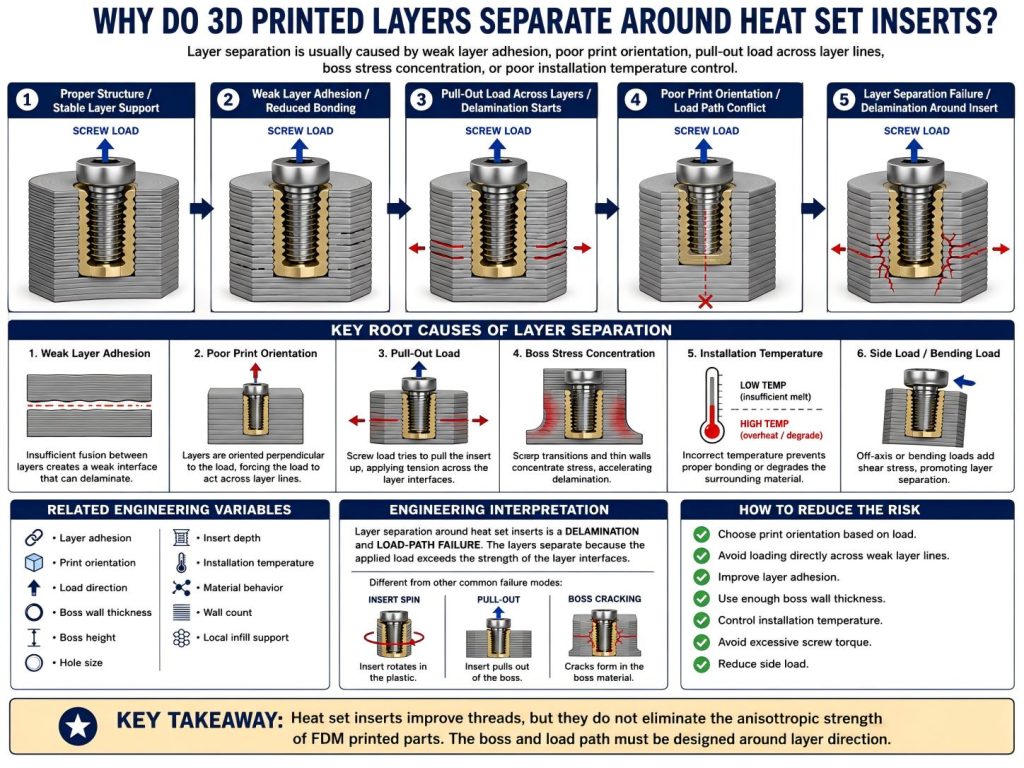
Root Causes
Weak Layer Adhesion
Layer adhesion controls how well one printed layer bonds to the next.
If layer bonding is weak, the boss around the insert may split along layer lines when the screw is tightened or when the part is loaded. This is especially important in FDM printed parts because strength is often lower between layers than within a continuous printed path.
Weak layer adhesion can come from low nozzle temperature, poor material bonding, excessive cooling, under-extrusion, moisture, or unsuitable print settings.
When a heat set insert is loaded, the surrounding plastic may not fail as one solid mass. Instead, the part can separate along layer boundaries.
Unfavorable Print Orientation
Print orientation strongly affects insert strength.
If the insert is loaded in a direction that pulls across layer lines, the layers may separate before the insert itself fails. This can happen in brackets, covers, enclosures, fixtures, and parts where the screw creates axial or bending load through the boss.
A boss printed upright may behave differently from a boss printed sideways. The same insert, hole size, and material can produce different results depending on how the part was oriented during printing.
This is why insert strength should not be evaluated only by insert size. The load direction relative to layer direction matters.
Pull-Out Load Across Layer Lines
Pull-out load is especially dangerous when it acts against weak layer adhesion.
When a screw pulls on the insert, the force travels through the insert into the surrounding boss. If that force tries to separate printed layers, the failure may appear as delamination around the insert instead of clean insert pull-out.
In this situation, the insert may remain partially embedded, but the boss or surrounding wall begins to split along printed layers.
Boss Geometry That Concentrates Stress
A weak boss can concentrate stress near the insert.
Thin boss walls, sharp transitions, short bosses, unsupported edges, or sudden section changes can create local stress concentration. When the screw load reaches these areas, the printed layers may begin to separate.
A stronger boss distributes load into the surrounding printed structure. A weak boss forces the load into a small area, making delamination more likely.
Boss design affects not only cracking and pull-out strength, but also layer separation risk.
Poor Installation Temperature Control
Installation temperature affects layer separation in two ways.
If the insert is installed too cold, it may push into the part without enough plastic flow. This can create wedging pressure and local stress between layers.
If the insert is installed too hot, the surrounding plastic may over-soften, collapse, or weaken near the layer boundaries. The boss may look acceptable after installation, but its local structure can be damaged.
Controlled installation should soften the plastic enough for the insert to seat without forcing apart the printed layers.
Excessive Screw Load or Side Load
Layer separation can happen after installation if the screw applies too much load.
This may happen when a screw is over-tightened, when a bracket is bent, when an enclosure is clamped unevenly, or when vibration creates repeated loading.
Side load and bending load are especially important because they can peel or split printed layers around the insert. A joint that survives simple tightening may still fail under real service loading.
Related Engineering Variables
Layer separation around heat set inserts depends on several connected variables:
- Layer adhesion
- Print orientation
- Load direction
- Pull-out load
- Screw tightening torque
- Boss wall thickness
- Boss height
- Hole size
- Insert depth
- Installation temperature
- Material behavior
- Wall count
- Local infill support
- Cooling and extrusion settings
These variables should be evaluated as a system. A correct insert and hole size may still fail if the insert load is carried across weak layer lines.
The printed part is not equally strong in every direction. The fastening structure should be designed so that screw load, pull-out load, and service load are transferred through stronger material paths whenever possible.
Engineering Interpretation
Layer separation is a delamination and load-path failure.
It is related to pull-out failure, boss cracking, and insert loosening, but it is not exactly the same.
Pull-out failure happens when the insert loses axial retention and is pulled out of the printed part.
Boss cracking happens when the surrounding boss cannot contain radial or screw-induced stress.
Insert loosening happens when preload or interface stability is lost over time.
Layer separation happens when the force around the insert causes printed layers to split apart.
These failure modes can happen together. For example, weak layer adhesion can reduce pull-out strength. A cracked boss can open layer boundaries. Repeated assembly can weaken the insert interface and increase stress near layer lines.
This is why layer adhesion should be treated as part of fastening design, not only as a print quality issue.
How to Reduce the Risk
To reduce the risk of 3D printed layers separating around heat set inserts:
- Choose print orientation based on the expected screw and pull-out load.
- Avoid placing insert loads directly across weak layer lines.
- Improve layer adhesion through suitable print temperature, cooling, and extrusion settings.
- Use enough boss wall thickness around the insert.
- Avoid sharp transitions near the boss.
- Add support material around high-load bosses.
- Use correct pilot hole size.
- Control installation temperature.
- Avoid excessive screw torque.
- Reduce bending and side load where possible.
- Design the boss as part of the load path, not as an isolated hole.
In most cases, preventing layer separation requires aligning the fastening structure with the printed part’s strength direction.
A heat set insert can improve thread durability, but it cannot remove the anisotropic behavior of FDM printed plastic.
Related Root Cause Guides
Layer separation around heat set inserts is usually connected to layer adhesion, print orientation, pull-out loading, installation stress, and weak load paths through the printed part. For the main design variables, see Layer Adhesion and Heat Set Insert Strength and Pull-Out Strength of Heat Set Inserts in 3D Printed Parts.
Related InsertGuide Pages
- Layer Adhesion and Heat Set Insert Strength in 3D Printed Parts
- Pull-Out Strength of Heat Set Inserts in 3D Printed Parts
- How to Design Bosses for Heat Set Inserts
- Heat Set Insert Installation Temperature for 3D Printed Parts
- Heat Set Insert Hole Size Guide
- Why Heat Set Inserts Fail in 3D Printed Parts
- Why Do Heat Set Inserts Pull Out of 3D Printed Parts?
- Why Do Bosses Crack Around Heat Set Inserts?
FAQ
Why do layers split near a heat set insert?
Layers can split near a heat set insert when screw load, pull-out force, installation pressure, or boss stress acts across weak layer bonds. The insert may be strong, but the surrounding printed layers may not have enough interlayer strength to carry the load.
Is layer separation caused by poor print quality?
Sometimes, but not always. Poor layer adhesion can increase failure risk, but layer separation can also come from print orientation, boss geometry, load direction, screw torque, and installation temperature.
Can heat set inserts prevent layer separation?
No. Heat set inserts improve thread durability, but they do not eliminate the anisotropic strength of 3D printed parts. The printed structure still needs proper orientation, boss support, and load-path design.