
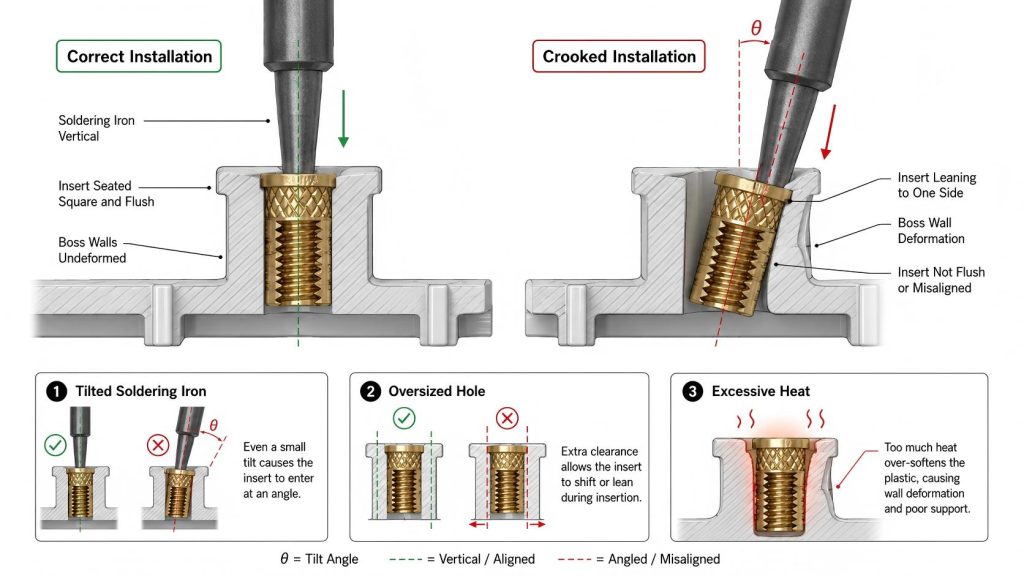
A heat set insert that goes in crooked can quickly turn a strong fastening point into a weak failure point in 3D printed parts.
Even a small alignment error during installation may cause thread misalignment, uneven load distribution, reduced pull-out strength, and long-term fastening problems.
If your insert is not sitting perfectly straight, here are the most common reasons.
How to Tell If an Insert Was Installed Crooked
- Screw enters at an angle
- Insert sits unevenly above the surface
- Plastic deforms on one side only
- Thread feels tight during assembly
- Insert rotates during screw tightening
If you notice these symptoms, installation alignment may have failed during the heating process.
Cause 1: The Soldering Iron Was Slightly Tilted
The most common reason is simple.
The soldering iron was not perfectly vertical while pushing the insert into the plastic boss.
Once the plastic begins to soften, even a small angle error can cause the insert to drift sideways.
Cause 2: The Hole Diameter Was Too Large
If the hole is oversized, the insert may shift before it starts melting into position.
The insert should never drop loosely into the hole before heating begins.
A proper hole diameter helps guide the insert straight during installation.
You can review our engineering guide here:
Heat Set Insert Hole Size Guide
Cause 3: Installation Temperature Was Too High
Excessive heat softens the surrounding plastic too quickly.
When plastic loses structural support, the insert may drift before fully seating.
Different materials behave differently during installation.
- PLA softens quickly
- PETG becomes flexible before melting
- ABS generally tolerates heat better
Related engineering reference:
Heat Set Insert Installation Temperature for 3D Printed Parts
Cause 4: Poor Boss Design Around the Insert
Boss geometry helps guide the insert during installation.
If the boss wall is too thin or dimensions are poorly designed, the insert may wobble while entering the plastic.
A stable boss structure improves alignment significantly.
Learn more here:
How to Design Bosses for Heat Set Inserts
How to Prevent Crooked Heat Set Insert Installation
- Keep the soldering iron perfectly vertical
- Use the correct hole diameter
- Avoid excessive installation temperature
- Apply steady downward pressure
- Design proper boss wall thickness
- Stop immediately if plastic begins collapsing
Related Engineering Guides
- Heat Set Insert Installation Temperature for 3D Printed Parts
- Heat Set Insert Hole Size Guide
- How to Design Bosses for Heat Set Inserts
Related Questions
- Why Do Heat Set Inserts Fail When the Hole Is Too Large?
- What Causes Boss Deformation Around Heat Set Inserts?
- Why Do Heat Set Inserts Spin in 3D Printed Parts?
Explore More Engineering Resources
Looking for more technical references and engineering design data?
Visit our complete engineering database here.