
Short Engineering Answer
Heat set inserts pull out of 3D printed parts when the surrounding plastic cannot resist axial load along the insert direction.
This usually happens because the insert does not have enough mechanical engagement with the printed material, the boss structure is weak, the insert depth is insufficient, the pilot hole is too large, or the layer orientation cannot support the pulling force.
Pull-out failure is different from insert spin. Insert spin is a rotational failure caused by poor torque resistance. Pull-out is an axial retention failure where the insert is physically pulled out of the printed part under screw load.
In many cases, the insert itself is not the weakest point. The real failure happens in the printed plastic around the insert.
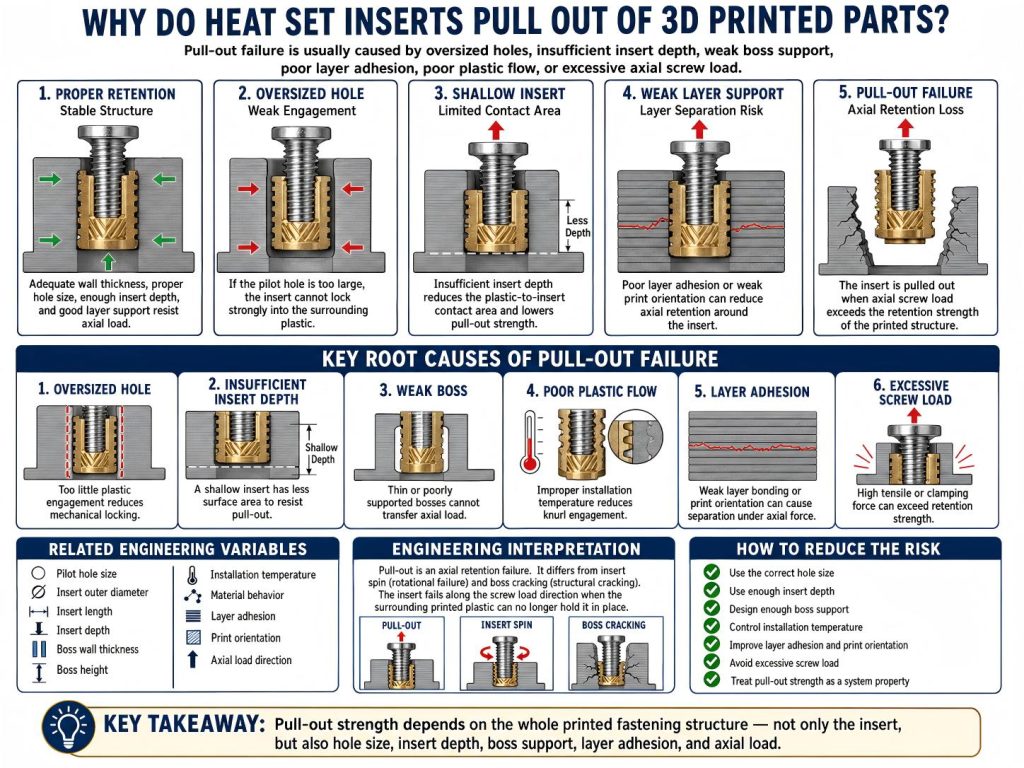
Root Causes
Oversized Pilot Hole
If the pilot hole is too large, the insert cannot displace and compress enough plastic during installation.
The knurled surface may not be fully surrounded by softened material. This reduces mechanical locking and makes the insert easier to pull out under axial load.
An oversized hole can also cause other failure modes, including insert spin and loose threads. But in pull-out failure, the most important issue is that the insert does not have enough material engagement in the axial direction.
Insufficient Insert Depth
Insert depth affects how much surface area is available to resist pull-out load.
A shallow insert has less contact area with the surrounding plastic. When the screw applies tensile force, the load is transferred through a smaller plastic-to-insert interface.
This is especially important for M3 inserts and small printed bosses, where a small change in insert length or installation depth can change the available retention area.
Weak Boss Geometry
The boss around the insert must support the load path.
If the boss wall is too thin, too short, poorly supported, or too close to an edge, the plastic around the insert may deform or fracture before the insert can carry the load.
A correct hole size does not guarantee pull-out strength. The boss must have enough material around and below the insert to distribute axial force into the printed part.
Poor Plastic Flow Around Knurling
Heat set inserts depend on softened plastic flowing around the knurled or textured outer surface.
If the insert is installed too cold, the plastic may not flow enough around the knurling. If it is installed too hot, the surrounding plastic may weaken, collapse, or lose structure.
Both conditions can reduce pull-out resistance.
Good installation creates controlled plastic flow around the insert without burning, voiding, or over-softening the boss.
Weak Layer Adhesion or Poor Print Orientation
3D printed parts are anisotropic. Strength is not equal in every direction.
If the pull-out load acts across weak layer lines, the insert may pull out by separating printed layers or breaking the boss along layer boundaries.
Layer adhesion, print orientation, wall count, infill support, and local geometry all affect pull-out strength. A strong insert in a weak layer direction can still fail.
Excessive Screw Load
Pull-out failure can happen when the screw applies more axial load than the printed structure can resist.
This may come from over-tightening, a loaded bracket, a clamped enclosure, a fixture under tension, or a part that experiences repeated service loads.
The screw does not need to break the insert. It only needs to create enough force to exceed the plastic-to-insert retention strength.
Related Engineering Variables
Pull-out strength depends on several connected variables:
- Pilot hole size
- Insert outer diameter
- Insert length
- Insert depth
- Boss wall thickness
- Boss height
- Material behavior
- Installation temperature
- Plastic flow around knurling
- Screw engagement length
- Pull-out load direction
- Layer adhesion
- Print orientation
- Wall count and local infill support
These variables should be evaluated together. A longer insert may improve retention, but it cannot fully compensate for a weak boss, poor layer orientation, oversized hole, or overheated plastic.
Pull-out strength is not only a property of the insert. It is a property of the whole printed fastening structure.
Engineering Interpretation
Pull-out is an axial retention failure.
The insert fails along the direction of the screw load when the printed plastic can no longer hold it in place.
This is different from insert spin and boss cracking.
Insert spin happens when the insert rotates because the plastic-to-insert interface cannot resist torque.
Boss cracking happens when the surrounding boss structure cannot contain radial stress.
Pull-out happens when the insert loses axial holding strength and is pulled out of the part.
These failure modes can interact. For example, an oversized hole can reduce torque resistance and pull-out strength at the same time. A cracked boss can also reduce axial retention because the surrounding plastic no longer supports the insert.
This is why pull-out strength should be treated as a system property involving hole size, boss design, material behavior, layer adhesion, and screw loading.
How to Reduce the Risk
To reduce the risk of heat set inserts pulling out of 3D printed parts:
- Use the correct pilot hole size for the insert and material.
- Choose an insert length suitable for the expected load.
- Install the insert to the correct depth.
- Design enough boss wall thickness around the insert.
- Provide enough boss height below and around the insert.
- Control installation temperature to create proper plastic flow.
- Avoid overheating or collapsing the boss.
- Align the pull-out load with a stronger print direction when possible.
- Improve layer adhesion through print settings and orientation.
- Avoid excessive screw tightening torque.
- Use longer or larger inserts only if the boss can support them.
In most cases, improving pull-out strength requires improving the printed structure, not only changing the insert.
A heat set insert can only hold as well as the plastic around it allows.
Related Root Cause Guides
Pull-out failure is usually connected to boss geometry, insert depth, hole sizing, layer adhesion, and the direction of the applied load. For the main design variables, see Pull-Out Strength of Heat Set Inserts in 3D Printed Parts, How to Design Bosses for Heat Set Inserts, and Layer Adhesion and Heat Set Insert Strength.
Related InsertGuide Pages
- Pull-Out Strength of Heat Set Inserts in 3D Printed Parts
- M3 Heat Set Insert Pull-Out Strength for 3D Printed Parts
- How to Design Bosses for Heat Set Inserts
- M3 Heat Set Insert Boss Design for 3D Printed Parts
- Heat Set Insert Hole Size Guide
- M3 Heat Set Insert Hole Size for 3D Printed Parts
- Layer Adhesion and Heat Set Insert Strength in 3D Printed Parts
- Heat Set Insert Installation Temperature for 3D Printed Parts
- Why Heat Set Inserts Fail in 3D Printed Parts
FAQ
Is pull-out failure caused by the insert or the plastic?
Pull-out failure is usually caused by the printed plastic structure losing axial retention around the insert. The metal insert may remain undamaged, but the surrounding plastic may be too weak, too thin, poorly bonded, or insufficiently engaged with the insert knurling.
Does a longer heat set insert improve pull-out strength?
A longer insert can improve pull-out strength by increasing contact area, but only if the boss has enough depth, wall thickness, and material support. A longer insert placed into a weak or thin boss may not improve reliability.
Is pull-out failure the same as insert spin?
No. Pull-out is an axial failure where the insert is pulled out of the printed part. Insert spin is a rotational failure where the insert turns inside the plastic under screw torque.